SOLUTION CASE STUDY · SOFTWARE TESTING AND QA
Pre-launch QA for a SaaS booking platform
Finding the failures that matter before the first real business signs up
Clickmasters · Clickmasterssoftwaredevelopmentcompany.com · October 2026
About this case study. It shows how Clickmasters plans and runs pre-launch QA for a SaaS booking platform, built from a founder's project brief: our method, test design, delivery plan and deliverables. Effort figures are estimates and outcomes are targets; it does not report results from a completed engagement.
- Test charters
- 20+TEST-001 to TEST-020, each traced to a line in the brief
- Launch-critical estimate
- 16–22h32 to 46 hours for full coverage, retest included
Book a free QA scoping call
Tell us about your platform. We will reply with scoping questions and a written estimate.
At a glance
The brief at a glance
Platform, users, payments, plans and effort the whole engagement summarised in one view.
- Platform
- Multi-tenant SaaS for appointment booking, with a public booking link for each business
- Users covered
- Business owners and their customers; Super Admin where access is provided
- Payments
- Customer deposits through Mollie, tested in Mollie's test mode
- Plans
- Three subscription tiers with a free trial
- Devices
- Desktop, mobile and tablet; Chrome and Safari; installable PWA
- Engagement type
- Pre-launch manual QA and release-readiness review
- Estimated effort
- 16 to 22 hours launch-critical; 32 to 46 hours full coverage
- Outputs
- Defect log, UX list, tenant-separation check sheet, release summary, retest report
Part 0
Summary
A founder preparing to open a multi-tenant SaaS booking platform to its first real businesses needed an independent pass over every user journey: business owner and customer, desktop and mobile, deposits through Mollie and three subscription tiers.
This case study sets out how Clickmasters plans and runs that work. It is a risk-based manual test that starts where a launch failure would hurt most: double bookings, payment and booking statuses drifting apart, and one business seeing another's data. It ends with a reproducible defect log, a clear fix-first or go verdict, and a retest of every fix.
Part 1
The challenge
The founder had built a multi-tenant booking platform. Each business signs up, sets its services, staff and opening hours, and shares a public booking link. Customers choose a slot and pay a deposit through Mollie. Businesses move from a free trial to one of three plan tiers, and the app can be installed on a phone as a PWA.
The product was live and in its final testing phase. Before inviting real businesses, the founder wanted an independent tester to use it end to end in both roles, as a shop owner and as a customer.
The brief was specific about what good output looks like:
- 01
Every issue with a clear title, a severity from Critical to Low, steps to reproduce, expected and actual results, the device and browser, and a screenshot or recording.
- 02
Bugs kept apart from UX and improvement suggestions.
- 03
A short verdict on whether anything critical must be fixed before real businesses start.
- 04
One retest after the developer's fixes.
It also set a boundary. No penetration test was wanted, but obvious permission and data-isolation problems found during normal use had to be reported: one business must never reach another's customers, bookings or data.
Part 2
Why booking platforms fail quietly
A crash gets noticed on day one. The costly launch defects in a booking product are quieter, and they surface only when real customers arrive.
Part 3
Our approach
We test risk first. The first hours go to the three capabilities a launch cannot survive without, and everything else is covered around them.
Bookings without conflicts
We compare the slots offered with the configured opening hours and staff availability, submit the same slot from two devices within seconds, mix manual and online bookings, and check which slots reschedules and cancellations free up. Edge cases include midnight, same-day past slots and the repeated hour when clocks go back in October.
Deposits and statuses in step
Mollie's test mode lets a tester choose the outcome of each payment without moving money (Mollie: Testing). For paid, failed, cancelled and expired we check the booking status, whether the slot is held or released, and which emails go out. After each session we reconcile three counts: bookings created, payments shown and emails received.
Tenant separation
We set up two test businesses. Logged in as one, we try to open the other's customers, bookings, services and staff through ordinary links and by changing record identifiers in the address bar. Any exposure goes to the founder privately the same working day.
Around that core we cover sign-up, email verification, password reset, onboarding and trial, plan limits, every transactional email, responsive layout and the installable app.
The booking and deposit flow under test
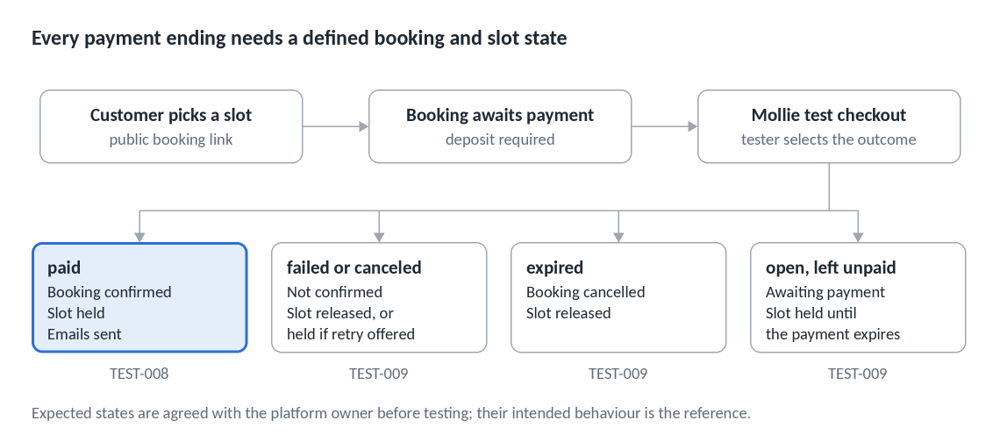
Figure 1. Booking and deposit flow: 3 steps, 4 payment outcomes
The paid path is checked by TEST-008. The three unpaid endings are checked by TEST-009, where a held slot that never frees is the main risk.
Part 4
What we test
Coverage map
Payment status mapping
The first column is Mollie's published list of statuses. The expected states are agreed with the founder before testing starts, because the founder's intended behaviour is the reference.
Tenant-separation checks
These checks use no scanners, scripts or attack payloads. They find obvious isolation faults through normal use and are not a penetration test.
Part 5
Test design
Twenty test charters cover the brief. Each traces to a line in the brief and is executed manually; TEST-008, TEST-009 and TEST-011 are the strongest candidates for later automation.
Test charters
Severity scale
The scale is agreed at kickoff so priorities are never disputed later.
Device and browser matrix
Exact OS and browser versions are recorded on every report.
How we document a bug
This is a format sample with synthetic data, not a finding.
- — 01
Title: Booking: slot stays blocked after the deposit payment expires
- — 02
Type and severity: Bug, High
- — 03
Device and browser: iPhone, Safari; exact versions recorded per session
- — 04
Expected result: the booking shows as cancelled and 10:00 is offered again.
- — 05
Actual result: 10:00 is not offered; the dashboard shows the booking as awaiting payment.
- — 06
Evidence: screen recording and two screenshots; reproduced 3 of 3 attempts.
Steps to reproduce:
- 01
Open the public booking link of TEST Salon A.
- 02
Choose service TEST Cut 30, staff TEST Staff 1, tomorrow at 10:00.
- 03
Enter customer details and continue to payment.
- 04
On the Mollie test screen choose Expired and continue.
- 05
Reopen the booking link and look at tomorrow at 10:00.
Release advice
- — 01
Entry gate. Testing starts when access works, two test businesses exist, the scope is agreed and the severity scale is accepted.
- — 02
Verdict. The summary says fix first if any Critical is open, or any High in booking, deposits or tenant separation. Otherwise it says go, with the listed known issues.
- — 03
Decision owner. The founder decides whether to launch. We advise; we do not certify the platform.
Part 6
Engineering decisions and trade-offs
Part 7
Delivery plan
The engagement runs in six phases with four gates. Hours are estimates, confirmed after a first look at the platform.
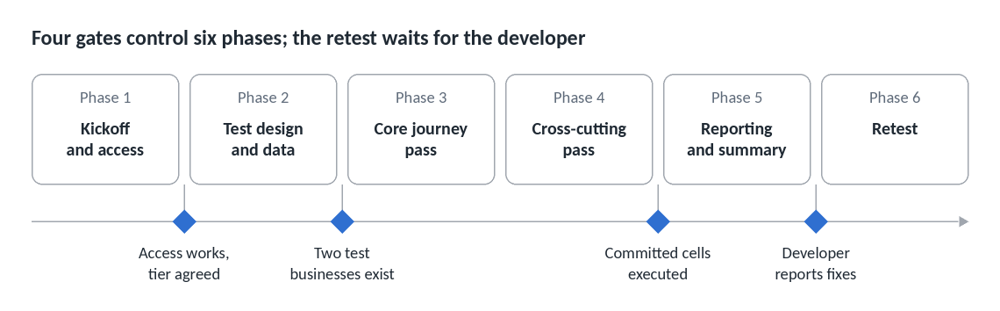
Figure 2. Delivery roadmap: 6 phases, 4 gates
Each diamond is a gate: work moves to the next phase only when its condition holds.
Two scope options
The launch-critical option, an estimated 16 to 22 hours, covers the three priority areas end to end, sign-up and onboarding, the core emails, one plan tier in depth with spot checks on the others, and desktop Chrome, iPhone Safari and Android Chrome, with the retest included.
The full coverage option, an estimated 32 to 46 hours, adds every rule and status, all payment methods offered, every plan tier, reminders, the complete device matrix and the installed PWA.
Either way, the founder receives a written list of anything not covered, so nothing is skipped silently.
Part 8
What the founder receives
- — 01
A defect log in the founder's own tracker or a shared sheet, one issue per record, with every field the brief asked for.
- — 02
A separate list of UX and improvement suggestions.
- — 03
A tenant-separation check sheet showing what was attempted and the result.
- — 04
An evidence pack of screenshots and recordings, named by defect ID.
- — 05
A one-page release summary with the fix-first or go verdict, traced to the logged issues.
- — 06
A list of what was not tested and why.
- — 07
A retest report covering every fix, plus a smoke re-run of the core journeys.
Working rhythm. A progress note each testing day; any Critical defect reported privately the same working day; the retest started within two working days of the developer reporting fixes. All test data carries a TEST prefix so it can be purged at close, and the tester's access is removed when the work ends.
Part 9
Target outcomes
Targets are set before testing and measured during the engagement.
We do not forecast a bug count. A clean result would show the tested journeys work; it would not prove the platform secure or scalable.
Part 10
Risks we plan for
Part 11
What this engagement does not cover
Load and performance testing, penetration testing, accessibility conformance audits and legal or regulatory compliance reviews sit outside this scope, and live-mode payments are not exercised. The release summary says so plainly. Where they matter, we recommend them as follow-on work: an automated smoke suite for the booking and payment paths, an email sender-authentication review, an accessibility review, a load test and a specialist penetration test.
Part 12
About Clickmasters
Clickmasters is a software house and digital agency with 13 years in business, serving clients across Pakistan, the GCC, the UK, Europe, the USA and Malaysia. Its software practice covers custom software and SaaS development, API integration, QA and DevOps.
Next step. Preparing to onboard your first customers onto a booking, scheduling or subscription product? Contact Clickmasters through Clickmasterssoftwaredevelopmentcompany.com with a short description of your platform. We will reply with scoping questions and a written estimate for both scope options.
Sources
Checked on 5 October 2026.
- — 01
Testing, Mollie documentation.
- — 02
Handling payment status, Mollie documentation.
- — 03
OWASP Top 10:2025, Introduction, OWASP.
- — 04
Making PWAs installable, MDN Web Docs.
Preparing to onboard your first customers?
Contact Clickmasters with a short description of your platform. We will reply with scoping questions and a written estimate for both scope options. The launch-critical option covers the three priority areas end to end; the full coverage option adds every rule, status, plan tier and device.
Software testing and QA · SaaS development · API integration · QA and DevOps